Why Expensive PC Builds Still Fail: Bad Assembly, Fake “Liquid Cooling,” and Lost Performance
I regularly see expensive gaming PCs and high-end workstations that look impressive at first glance but perform far below what their parts should deliver. On paper, everything seems right: a modern Ryzen or Intel CPU, a powerful RTX-class GPU, RGB memory, liquid cooling, and a motherboard from a recognizable brand. In practice, the system runs hot, boots slowly, crashes under load, drops frames in games, or behaves inconsistently for no obvious reason.
This is not rare. In many cases, the problem is not the hardware itself. The real issue is poor assembly, poor validation, and the kind of rushed build quality that hides behind expensive-looking parts.
Expensive Parts Do Not Guarantee a Stable System
When people build or buy a high-performance gaming PC, they usually choose what sounds impressive:
- a high-end CPU
- a powerful GPU
- fast RGB memory
- liquid cooling
- a “gaming” motherboard
At this level, you are not just assembling a PC — you are working within tight stability margins. Small mistakes in airflow, mounting pressure, BIOS settings, or memory configuration can turn an expensive system into an unstable one. A processor that costs $500 but constantly throttles under load may end up performing closer to a $200 chip in real work or gaming. And on top of that, it will spend its life running hotter than it should, with a higher chance of instability and faster long-term degradation.
A Real Example of a “Premium” Build Done Wrong
Here is a real-world example of the kind of build that looks impressive to a casual buyer but immediately raises concerns once you know what to look for.
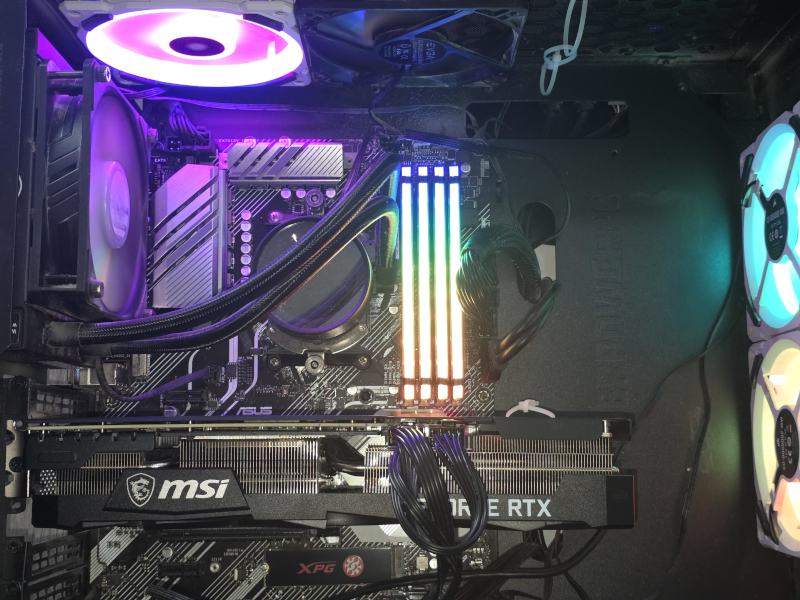 Expensive gaming PC slowly dying from bad assembly: poor airflow, weak cooling choices, insufficient motherboard mounting, and physical stress from unsupported components.
This system had expensive-looking components and the kind of styling people associate with performance, but the actual assembly quality was poor. The rear-mounted radiator was installed in the wrong airflow direction, working as intake where that position normally should be helping exhaust hot air. The motherboard was secured with only three screws out of nine possible ATX mounting points — which is honestly an anti-record. I have seen four screws before in sloppy builds, but three is worse than average even by bad standards. At the same time, the heavy graphics card had no real support and was visibly sagging, adding even more mechanical stress to an already poorly mounted motherboard.
That combination matters more than many people realize. A board that is not mounted properly can flex. A heavy unsupported GPU increases that flex. Once the board is under uneven mechanical stress, you start getting the kind of annoying, hard-to-diagnose issues that waste hours: memory instability, random crashes, inconsistent boot behavior, devices not being detected correctly, and systems that seem fine one day and broken the next. In this case, memory detection problems were one of the major symptoms, and the physical stress on the motherboard was a very likely contributor.
Why 120mm Liquid Coolers Are Often Worse Than Good Air Coolers
One of the most misleading things in many “gaming” builds is the presence of a 120mm liquid cooler. It looks premium, it says “water cooling,” and to many buyers it feels like an upgrade. In reality, a single 120mm AIO is often a poor choice for a performance system and in many cases loses to a decent mid-range tower air cooler.
- It has very limited radiator surface area
- It often runs louder under load
- It adds more points of failure: pump, tubing, and extra connections
- It is frequently chosen for appearance rather than thermal performance
That is why these coolers often make no sense in real builds. They are not “high-end cooling.” They are often just a prettier way to get mediocre thermal results. When a processor is already running close to its thermal limits, that fake upgrade becomes expensive decoration instead of a real solution.
Bad Cooling Installation Means Lost Performance
Even when the cooling hardware itself is acceptable, bad installation can ruin the result completely. I regularly see builds where airflow direction makes no sense, mounting pressure is uneven, thermal paste application is questionable, or the cooler simply does not match the heat load of the CPU.
- Rear exhaust positions are turned into intake for no good reason
- Coolers are mounted with uneven pressure
- Thermal paste is applied poorly or left old and degraded
- The cooling solution is selected to look impressive, not to handle the real load
The result is thermal throttling — the CPU cuts its own performance to avoid overheating. That means lower frame rates, lower benchmark scores, reduced productivity in rendering or video work, and inconsistent system behavior. In games, it often shows up as stuttering, sudden frame drops, unexplained hitching, or outright crashes. Under heavier workloads, you may see blue screens, random reboots, or a machine that simply refuses to stay stable.
So yes, you can absolutely pay premium money for premium parts and still get mid-range behavior if the system is assembled badly enough.
Motherboard Mounting Quality Is an Overlooked Disaster
This is one of the most ignored problems in amateur and rushed “professional” builds. A full ATX motherboard is designed to be supported properly across the case. When it is mounted with only three or four screws instead of the full set, you are no longer dealing with a rigid platform. You are dealing with flex, vibration, uneven stress, and a system that has no business carrying a heavy GPU and a cooling assembly as if everything were normal.
A motherboard under mechanical stress can create exactly the kind of problems that people blame on “bad RAM,” “bad Windows,” or “bad luck”:
- memory not training correctly
- random boot failures
- intermittent crashes
- PCIe-related instability
- strange hardware detection issues
These are the worst problems because they do not always fail in a clean, obvious way. They just make the system feel cursed.
Memory Instability Is Often a Build Problem, Not Just a Memory Problem
Modern RAM platforms are already more sensitive than older ones. DDR5 in particular can be temperamental, but even older DDR4 gaming systems become unstable when you combine aggressive profiles, bad board support, poor physical installation, or mechanical stress. A system like this can boot one day, fail memory training the next, and then start throwing random application crashes under load.
This is where rushed builders and “spec-sheet assembly” fail. They install parts, turn the system on once, see RGB light up, and call it complete. But a stable high-performance machine is not confirmed by lights and a successful POST screen. It has to be validated under real operating conditions.
Looks Sell, Engineering Sustains
A lot of modern PC builds are designed to look expensive rather than to behave correctly. RGB memory, liquid cooling, glass panels, and oversized GPUs create the appearance of performance, but appearance is not engineering. A well-built system should not just boot. It should run cool enough, stay stable under load, maintain expected performance, and avoid placing unnecessary stress on the hardware.
Without that, the buyer is not getting a high-end PC. They are getting a fragile pile of expensive components that may crash in games, lose performance under load, and wear out faster than it should.
The Real Takeaway
Bad builds do not always fail because the parts are cheap. Some fail because expensive hardware was assembled carelessly, validated poorly, or configured by people who understand specs but not systems. That is the real problem. Expensive parts do not protect a build from bad engineering.
If a system is overheating, throttling, crashing in games, losing performance under load, or behaving inconsistently, the answer is not always “replace parts.” Often the real issue is mechanical stress, airflow mistakes, poor cooler choice, bad mounting, or missing validation. A stable PC is not just assembled — it is engineered and checked properly.
If you are planning a new system or trying to fix one that never behaved the way it should, I also provide custom PC build and upgrade services in Boca Raton with proper assembly, diagnostics, and full system validation.