From an Unstable High-End Prebuilt to a Proper Custom Gaming PC Build
Sometimes a computer can look extremely impressive on paper while hiding major engineering problems underneath. This recent custom gaming PC project for a client in Parkland started with a large and expensive prebuilt system that initially seemed powerful enough for anything: Intel Core i9-14900K, RTX 4080 Super, 64GB DDR5 memory, liquid cooling, and a massive case packed with ten fans. Unfortunately, the system became increasingly unstable over time until it eventually stopped booting reliably altogether.
The first complaint from the owner was actually noise. Despite the huge number of fans and premium-looking hardware, the system sounded like a small aircraft under load. Shortly after that, random instability started appearing more and more frequently:
- random freezes and crashes
- boot instability
- occasional POST issues
- general operating system corruption symptoms
- increasing instability under heavy load
At first, the NVMe SSD looked suspicious. The system used a 2TB Teamgroup drive, and later during testing that SSD failed diagnostics directly from the BIOS on the replacement MSI motherboard. Initially this seemed like the likely root cause. However, even after removing the drive entirely for testing purposes, instability remained. Attempting to boot a Linux rescue environment from USB resulted in repeated kernel panic crashes, strongly suggesting broader platform-level instability rather than a simple storage failure.
Diagnostics and the Original Platform Problems
The original platform was based on an ASUS ROG Strix Z790 motherboard paired with an Intel Core i9-14900K. During disassembly, several additional concerns became obvious almost immediately. The socket area and CPU mounting hardware were heavily contaminated with excessive thermal paste, far beyond what should normally be used for proper cooler installation.
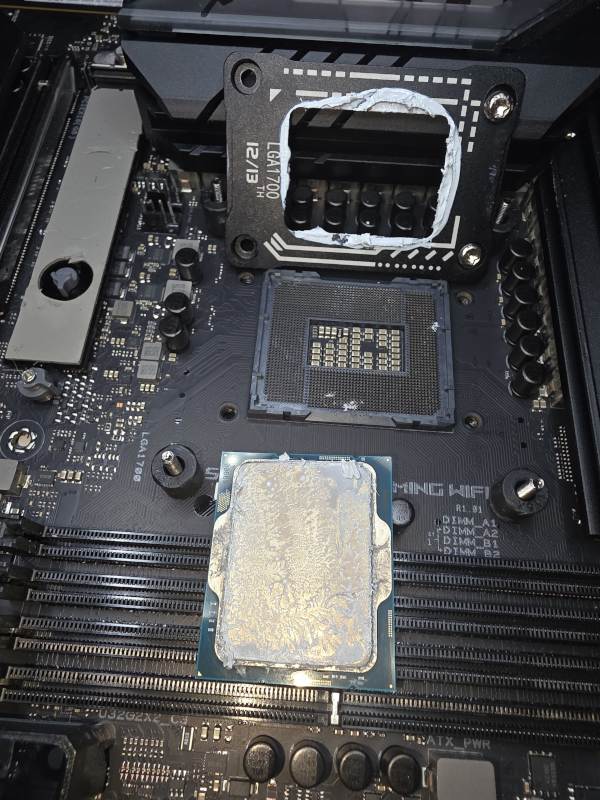 The original system showed signs of excessive thermal paste application and questionable assembly quality.
The motherboard was also still running extremely aggressive power behavior despite Intel’s later microcode and BIOS guidance regarding stability issues on high-end 13th and 14th generation processors. The system showed symptoms very consistent with the widely reported instability problems affecting aggressively tuned Intel platforms under excessive voltage and power conditions.
Another issue was memory configuration. Although the system contained DDR5-6000 memory, it had been operating at only 4800 MT/s. Combined with the overall instability and failed Linux recovery attempts, it became increasingly clear that continuing to troubleshoot the original platform no longer made practical sense.
Deciding to Rebuild the System Properly
Rather than endlessly fighting a compromised platform, we decided to rebuild the system correctly from the ground up while retaining several perfectly good high-end components:
- ASUS TUF RTX 4080 Super
- Thermaltake 1050W power supply
- Corsair Vengeance DDR5 64GB kit (2x32GB)
Everything else was redesigned with a strong focus on thermal efficiency, airflow engineering, long-term stability, serviceability, and lower acoustic noise.
The new platform included:
- AMD Ryzen 7 9800X3D
- MSI X870 Tomahawk motherboard
- Samsung 9100 Pro 2TB NVMe SSD
- MSI MAG 360 liquid cooling
- MSI Velox 300 Airflow case
- Additional reverse-blade intake fans below the GPU
Building Around Airflow Instead of Marketing
One of the biggest differences between the original system and the rebuilt platform was airflow philosophy. The original case technically had more fans, but significantly worse acoustic and thermal behavior. Simply adding more fans does not automatically create better cooling.
The new MSI Velox 300 Airflow chassis provided a much cleaner and more directional airflow layout with excellent front intake ventilation, removable filters, easy maintenance access, and far better internal airflow management overall.
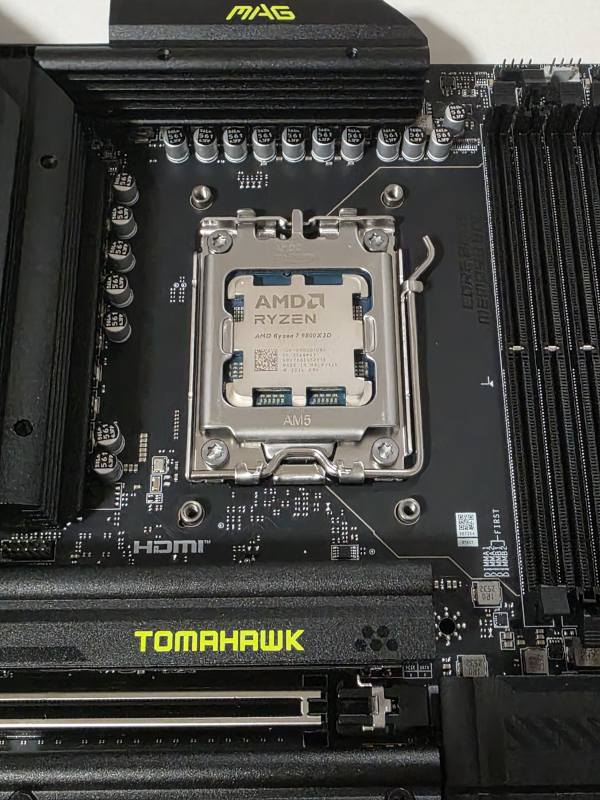 The new build moved to an AMD Ryzen 7 9800X3D platform focused on stability, airflow, and thermal efficiency.
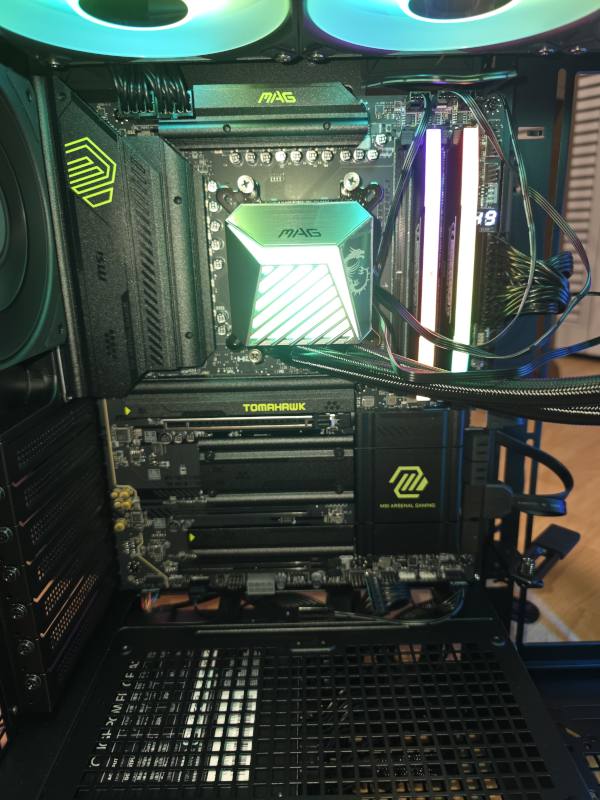 Careful cooler installation, balanced mounting pressure, and clean internal layout make a major difference in long-term stability and thermals.
The cooling system was installed carefully using proper thermal paste application, controlled mounting pressure, and cross-pattern tightening to ensure even contact across the CPU heat spreader. Additional reverse-blade intake fans were mounted below the graphics card to improve GPU airflow without disrupting overall case pressure balance.
ARGB lighting was also synchronized cleanly through the integrated case controller to create a polished appearance without turning the system into an overcomplicated RGB showcase.
Final Testing and Results
After assembly, the system was stress-tested extensively using AIDA64 and additional stability testing. The final memory configuration was tuned for stability rather than marketing numbers, running at 5600 MT/s with tightened timings after validation and testing.
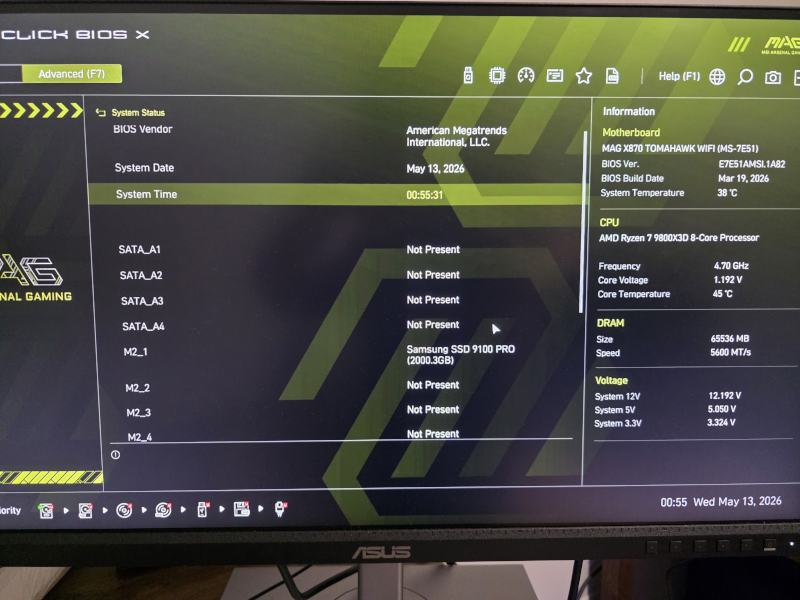 Final BIOS validation after assembly and tuning. The system was stabilized with optimized DDR5-5600 settings and Samsung 9100 Pro NVMe storage.
The final thermal results were dramatically better than the original platform. Under sustained heavy load, the Ryzen 7 9800X3D remained below 70°C while the entire system stayed surprisingly quiet. Unlike the original build, the new platform delivered both high-end performance and proper acoustic behavior at the same time.
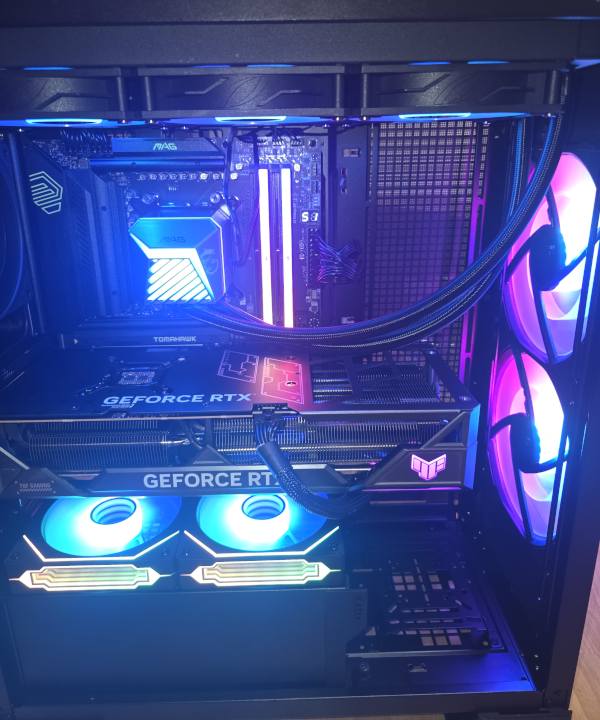 The completed system features optimized airflow, lower noise levels, synchronized ARGB lighting, and significantly improved thermal behavior.
Final Thoughts
This project became a good example of something many gaming PC buyers eventually discover: expensive parts alone do not automatically create a properly engineered system. Real-world stability depends just as much on motherboard configuration, airflow design, thermal management, power behavior, cooler installation quality, and overall platform balance.
In this case, rebuilding the system correctly produced a dramatically better result than continuing to fight an unstable high-end prebuilt platform.
Need help with a custom gaming PC, workstation upgrade, cooling optimization, or troubleshooting unstable high-end systems in Boca Raton, Parkland, Delray Beach, or surrounding South Florida areas? Learn more about custom PC assembly and upgrade services here: