Why I Don’t Recommend the Most Expensive CPU (And What I Use Instead)
Intel recently released a new lineup of CPUs, and as expected, many people immediately look at the top-tier options thinking more expensive = better. In reality, that’s rarely the case.
The Reality Behind “Top-Tier” CPUs
In many real-world builds, the new Ultra 7 performs almost identically to the more expensive Ultra 9, but at a much lower price point. For most users, even fairly demanding ones, the difference in everyday performance is negligible. What actually matters is how balanced the entire system is. CPU, storage, memory, cooling — all of it has to work together. Throwing money at the most expensive processor often just creates a bottleneck somewhere else.
Where People Go Wrong
A lot of builds I see follow the same logic: “Let’s just get the best CPU so it lasts longer.” It sounds reasonable, but in practice it leads to overspending and poorly optimized systems. Instead of improving performance, it often results in wasted budget that could have gone into faster storage, better cooling, or a more reliable motherboard.
The Hidden Problems Nobody Talks About
What most people don’t realize is that many motherboards don’t support new CPUs out of the box. You often need a BIOS update, and without a compatible CPU, you might not even be able to boot the system in the first place.
And not all motherboards are built the same. Pairing a high-end CPU like an Ultra 9 with a cheap board that has weak power delivery can actually result in worse real-world performance and stability. In contrast, a properly built motherboard with strong VRMs, for example 16+ power phases, paired with an Ultra 7 will often perform better and run more reliably under load.
And that’s just one of the hidden pitfalls. I’ve already seen brand new, expensive motherboards come in with bent socket pins from incorrect CPU installation, turning what was supposed to be a straightforward build into an expensive mistake. It doesn’t take much: slight misalignment, uneven pressure, or rushing the installation, and suddenly a perfectly good board is damaged. At that point, you’re not building a PC anymore, you’re dealing with avoidable repair costs.
Cooling: The Performance Factor People Ignore
Cooling is another part people often underestimate, and it can have a massive real-world impact. I’ve personally seen this make a significant difference. Back when a new platform came out, I had to temporarily use a low-end cooler because proper mounting support wasn’t available yet. The system itself was built on a premium MSI MPG motherboard with more than enough power delivery, so the CPU wasn’t limited by the board at all. The only bottleneck was cooling.
After switching to proper liquid cooling, a long Java build that previously took about 21 minutes dropped to around 17 minutes — roughly a 19% improvement, just from better cooling. And this is important: it’s not just about gaming. In workloads like rendering, video editing, or compiling code, cooling directly affects how long the CPU can maintain its boost clocks. Poor cooling leads to thermal throttling, and that directly translates into lost performance.
I’ve seen systems with expensive CPUs underperform simply because of poor cooling choices. This is exactly the kind of detail most people don’t account for when picking parts.
What Actually Makes a Good Build
A good system isn’t about the most expensive parts — it’s about the right combination. In many cases, a properly chosen Ultra 7, a solid motherboard with strong VRMs, fast SSD storage, and adequate cooling will outperform a poorly planned Ultra 9 build in real-world use. The difference isn’t in specs — it’s in understanding how everything works together.
- CPU: powerful enough for the real workload, not just expensive on paper — and paired with sensible memory. Overspending on high-frequency RAM rarely brings real gains compared to investing in a better CPU
- Motherboard: stable power delivery, compatibility, and support for the right memory type. The same CPU can work with different memory standards depending on the board, so the choice matters
- Storage: fast SSDs where they actually matter — not all SSDs are equal. Low-end QLC drives can slow down significantly under load and, in some cases, approach HDD-like performance
- Cooling: enough thermal headroom to sustain boost performance, not just the CPU cooler, but also proper case airflow and balanced system ventilation
- Power Supply: reliable unit with proper protections and the right connectors — not just “more watts”. A cheap PSU is one of the fastest ways to turn a good build into a dead one
- GPU: depends on the use case. For non-gaming systems, a dedicated GPU is often unnecessary. For gaming, it becomes the primary performance factor and usually matters more than a higher-end CPU
GPU choice is another place where people often overspend. You can go for a premium model, or choose a more basic version for roughly the same performance at a better price — or even step up to a higher-tier GPU for the same money.
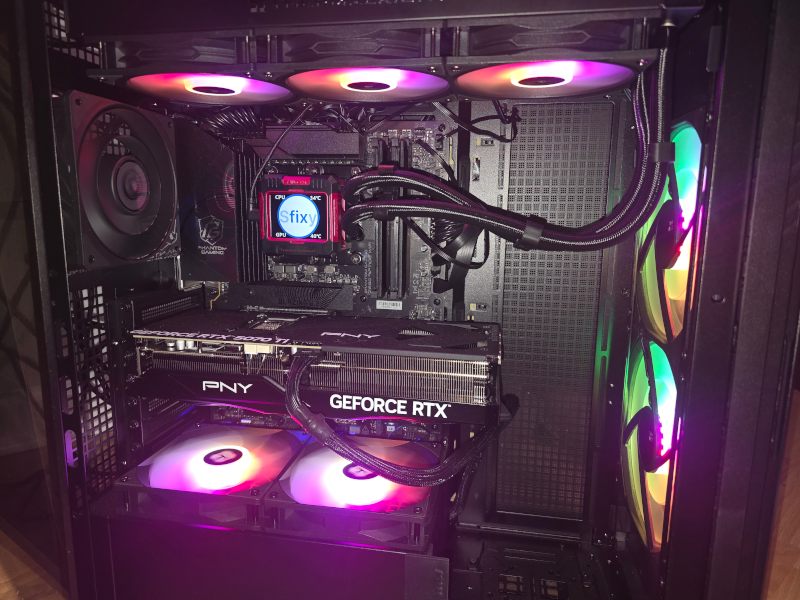
The reality is: with a quality PSU and proper cooling, even a more basic GPU model will run just as stable and deliver the same real-world performance. What you’re often paying extra for is aesthetics, branding, and slightly better thermals — not a meaningful performance difference.
This is exactly the kind of trade-off where smart allocation of budget matters more than chasing the most expensive part in every category.
Why This Matters
I’ve already seen multiple cases where people bought new CPUs and couldn’t even get the system to start because of outdated BIOS or compatibility issues. Others ended up with damaged components from improper installation. These aren’t rare edge cases — they happen more often than you’d think.
The Bottom Line
Choosing parts is only half the job. Proper compatibility, setup, and installation matter just as much. It’s very easy to overspend and still end up with a system that doesn’t perform the way you expected, or worse, doesn’t boot at all.
Custom PC Builds in South Florida
If you’re planning a new build or upgrading an existing system, I can help you choose the right components and make sure everything works correctly from day one — no compatibility issues, no wasted budget, no unpleasant surprises. I provide PC build and upgrade services in South Florida, including custom PC builds in Boca Raton and nearby areas.