When a “Dead” Commercial Printer Just Needs a Calm Diagnosis
Canon imageRUNNER ADVANCE C256iF — Office Relocation Case, Pompano Beach
Office relocations are wonderful. New space, fresh start, better layout — and occasionally a printer that decides it has suffered enough.
In this case, the device was a Canon imageRUNNER ADVANCE C256iF, a proper commercial multifunction system built for real office workloads. Not a home printer you replace because it feels emotional.
After the move, it powered on and immediately displayed E00280-0001. The scanner/ADF module was visibly shifted. Not a subtle “maybe” shift — the kind that makes you quietly calculate what a replacement assembly costs.
For this model, a full scanner unit replacement can easily exceed $1,000 in parts alone, before labor. So the real question wasn’t just technical. It was financial.
Was this going to be a parts order? Or just physics and forgotten transport locks?
Commercial printers aren’t fragile — but they are precise. During relocation, if transport locks aren’t engaged, upper assemblies can shift just enough to disconnect internal harnesses. Nothing dramatic. Just enough to convince the system that something is catastrophically wrong.
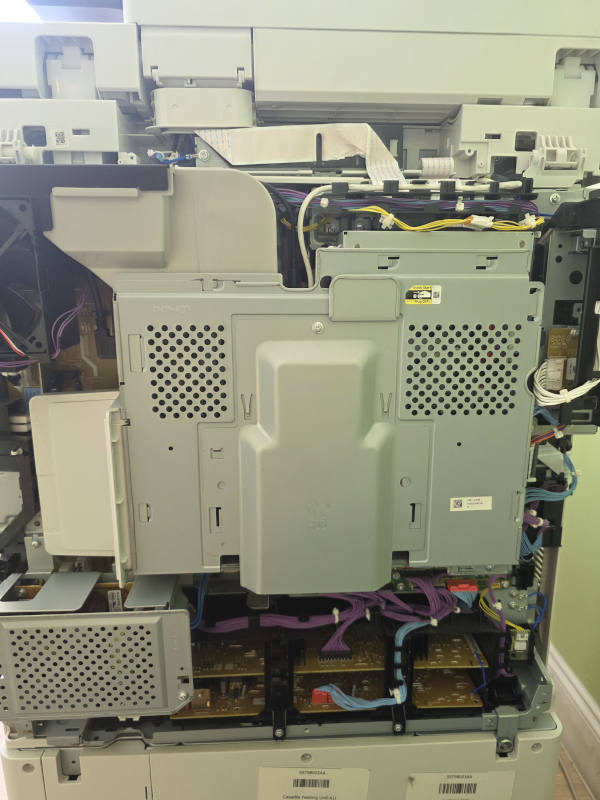
After opening the upper section, the picture was clear. Several internal cables had partially pulled out. The scanner assembly had shifted off its alignment points. No burnt boards. No cracked components. No smoke. Just displacement.
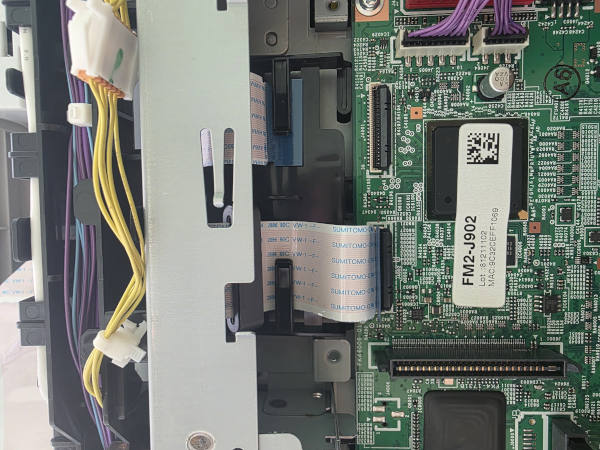
Careful reseating of connectors and proper realignment brought the device back to life. It booted. It copied. The office relaxed.
But of course, that wasn’t the end.
The printer could copy locally — but it could not print from any workstation. The device had been configured with a static IP in the 10.1.x.x range, but the new office network operated on 192.168.x.x, and naturally the administrative settings were locked and no one knew the System Manager credentials. Because why would they.
What looked like “printer is broken” turned into “printer is isolated.”
In business environments, downtime is rarely just an inconvenience. Staff wait. Documents queue. Workflows stall. People stand around staring at a machine that looks fine but refuses to cooperate.
Administrative access had to be reset. Network parameters reconfigured. Proper IP settings assigned. Workstations reconnected. Only after both layers — mechanical and configuration — were addressed did the system fully return to operational status.
This is the part many offices don’t see: commercial equipment failures are often a chain reaction. Misalignment leads to communication errors. Configuration mismatches add another layer. Locked settings complete the illusion of total failure.
From the outside, it looks like a four-figure hardware disaster. In reality, it was precision work and systematic troubleshooting.
If you’re relocating commercial or heavy-duty office equipment, a few simple precautions prevent a lot of drama:
- Engage transport locks
- Stabilize upper assemblies
- Document network settings before disconnecting
- Test before declaring the move complete
Preventative inspection costs less than emergency downtime — and much less than unnecessary parts replacement.
In this case, full functionality was restored the same morning, without replacing a single major component.
Sometimes a “dead” commercial printer isn’t dead — it’s just misunderstood. If your office printer stopped working after relocation, especially large multifunction devices like Canon imageRUNNER, the problem is often something simple like mechanical misalignment or a disconnected internal cable. If you're located in the area, we provide printer repair in Pompano Beach with on-site service for office equipment.
Common issues after moving office printers
- Loose internal cables after transportation
- ADF or scanner modules shifting during the move
- Incorrect network configuration after reconnecting the device
- Scan-to-email or driver settings needing reconfiguration
Office relocations break more printers than age does. If yours stopped working after the move, or for any other reason, contact Sfixy IT Services and we’ll take a look.