Are Mini PCs Reliable in Florida?
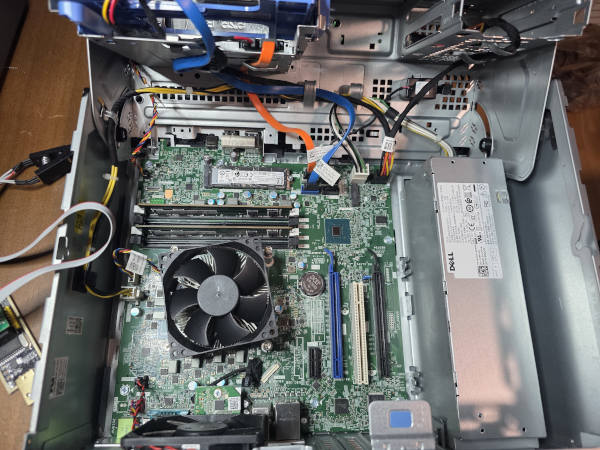
You walk into a large electronics store in Boca Raton. A consultant shows you a sleek, compact desktop.
“It’s powerful, takes up almost no space, and it’s only $799. Perfect for a home office.”
And at first, it seems like a great decision. For several months, everything works smoothly. Then small issues begin: random shutdowns, a cooling fan that suddenly sounds much louder than before, or limitations when trying to connect additional monitors and peripherals.
As someone who regularly services these systems across South Florida, I see a clear pattern. Most mass-market mini PCs are designed for convenience — not longevity. Here’s what that means in practice.
1) Proprietary design limits repair
Many compact systems rely heavily on proprietary components. The motherboard layout, power supply, and mounting system are often custom-built to fit the small enclosure.
If a major component fails outside warranty, replacement parts can be expensive and difficult to source. In many cases, replacing the entire unit becomes more practical than repairing it. That’s not necessarily bad design — it’s simply a different philosophy: replace rather than upgrade.
2) Florida climate and thermal stress
Florida’s humidity and fine airborne dust create additional stress on electronics. Mini PCs prioritize size reduction, which means internal space is limited and airflow is restricted compared to standard desktop cases.
To make matters worse, some compact systems still ship with traditional 3.5" mechanical hard drives — even in 2026. These drives generate additional heat, produce vibration and noise, and occupy a significant portion of the already limited internal volume.
In an enclosure where every cubic inch matters, dedicating space to a spinning mechanical drive further reduces cooling efficiency.
Under load — system updates, multitasking, heavy spreadsheets — temperatures can rise significantly. In a larger case with proper ventilation, that heat dissipates efficiently. In compact systems, heat accumulates around tightly packed components and mechanical storage, gradually affecting surrounding parts over time.
Common symptoms include:
- Random shutdowns or restarts
- Fans that get noticeably louder with age
- Performance throttling under light workloads
- Instability at the worst possible moment
3) Limited expandability
Compact systems often offer minimal expansion options. Additional monitors may require adapters. Storage upgrades can be constrained. Graphics upgrades are usually not possible at all.
In other words, the configuration you purchase is typically the configuration you’ll keep.
A different approach
For users who value longevity, airflow, and upgrade flexibility, standard-form-factor systems offer clear advantages:
- Better cooling with proper airflow
- Standard parts that are easier to service and replace
- Quieter operation with larger, slower fans
- Upgrade flexibility years down the line
The difference isn’t about brand — it’s about design philosophy and long-term reliability.
From our lab
Mini PCs are designed around compactness and perceived simplicity. Everything is tightly integrated, custom-shaped, and densely packed to achieve that small footprint on your desk.
But that compact, proprietary design comes with trade-offs. Limited airflow, restricted serviceability, and tightly clustered components mean there is very little margin for stress — whether that stress comes from heavy workloads, aging parts, or environmental factors.
In Florida, heat and humidity simply accelerate those weaknesses. What might be manageable in a well-ventilated full-size system becomes cumulative strain inside a confined enclosure.
Mini PCs absolutely have their place. But if long-term reliability, upgrade flexibility, and serviceability matter to you, it’s worth looking beyond the convenience of size alone — and considering how the system will perform years down the road, not just on day one.