Printer Not Working? This Is How Scammers Trick You
A simple printer problem turned into a $700 scam — and it happens more often than you think. I see cases like this regularly in my work here in South Florida, but this one is a textbook example of how easily things can escalate from a minor issue to a serious financial loss.
The Story
A client contacted me because she couldn’t connect her printer to a new computer. This is one of the most common requests I get — usually a straightforward setup that takes minutes. Like many people do, she searched online for support and ended up calling what she believed was HP support. Unfortunately, it wasn’t.
The person on the phone convinced her that her system had “security issues” and asked for remote access. After running a few “diagnostics”, they claimed the computer was infected and needed urgent cleanup. Within a short time, she was charged around $700 for what was presented as critical security work.
What the Scammers Actually Did
This follows a very common pattern known as a tech support scam. The scammers typically get remote access using tools like AnyDesk or TeamViewer, open system logs or command prompt to simulate problems, and then present normal system messages as signs of infection. They create urgency, use technical language to overwhelm the user, and push for immediate payment. In reality, no meaningful repair or security work is performed.
What I Found
When I inspected the system, there was no major infection or damage. However, the system had clearly been accessed remotely. I found remote access software still installed, along with multiple unnecessary programs added during the session. I removed all the junk software and remote access tools they installed, checked startup items, and made sure there was no remaining access left on the machine. The goal here wasn’t just cleanup, but restoring confidence that the system was actually secure.
The Real Fix
The original issue turned out to be exactly what it looked like — a typical printer setup problem. After cleaning the system, I properly connected and configured the printer, verified that it was working correctly, and ensured there were no leftover issues from the scam.
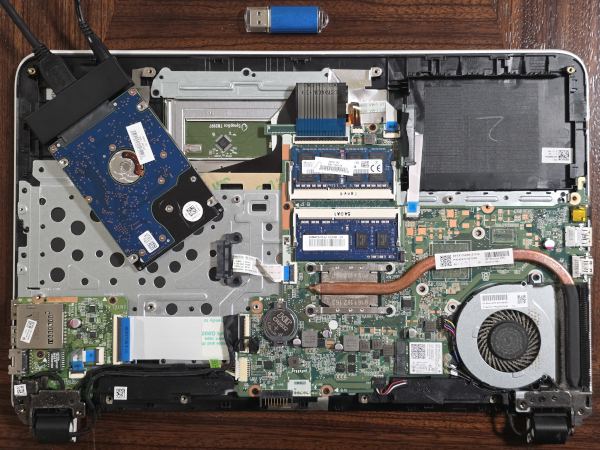
During the same visit, we looked at an old, non-booting laptop to see if it could be saved. After a quick diagnosis, I was honest with the client: a full repair and upgrade simply wasn't worth the investment given the age of the machine. Instead of pushing for an unnecessary (and expensive) hardware overhaul, we focused on what really mattered — the data. I disassembled the laptop, accessed the drive directly, and successfully recovered her important files onto a flash drive. The laptop is now headed for recycling, but her memories and documents are safe.
The Lesson
There are a few important takeaways from this situation. HP and Microsoft do not charge hundreds of dollars for basic support calls, and they will not diagnose “viruses” over the phone in this way. Any request for remote access from an unknown source should be treated with caution. Most importantly, if something feels off — it usually is. These scams rely on urgency and confusion, not actual technical issues.
How to Protect Yourself
The safest approach is to verify support numbers directly from official websites, avoid granting remote access unless you fully trust the person, and be cautious with large upfront payments for “urgent fixes”. In many cases, a local technician can quickly identify whether there is a real problem or not, and resolve it without unnecessary costs.
Professional Computer Help in South Florida
If you run into issues like this — whether it’s a printer that won’t connect, a system that may have been accessed remotely, or data recovery from an old computer — it’s always better to have someone local take a look. I provide on-site IT support, system cleanup, and computer repair services in South Florida, including Boca Raton and nearby areas.