A real $650 comparison: HP ProDesk SFF vs a custom build
After publishing the $450 comparison, a fair comment appeared: “Both builds are weak at that price.”
That’s not entirely wrong. At $450, you’re working within tight constraints. So let’s raise the bar to $650 and compare two realistic options:
- An HP ProDesk 400 G9 SFF listed at $649.99
- A custom-built desktop assembled from widely available A-brand components at $650.38
Same budget. Very different approach.
The Retail Option: HP ProDesk 400 G9 SFF (~$650)
The listing advertises an “Intel CPU,” 16GB RAM, and a 1TB PCIe SSD. That sounds solid — until you look closer.
In this configuration, “Intel CPU” refers to a Celeron processor — typically a dual-core part with Hyper-Threading (2 cores / 4 threads) running around 3.4 GHz. Modern Celerons are perfectly adequate for basic office work, but they are entry-level desktop chips designed for light productivity.
The system includes 16GB RAM and a 1TB PCIe SSD. However, the SSD model is not specified. In OEM systems, storage is often sourced under bulk contracts, and performance tiers may vary.
The Custom $650 Build
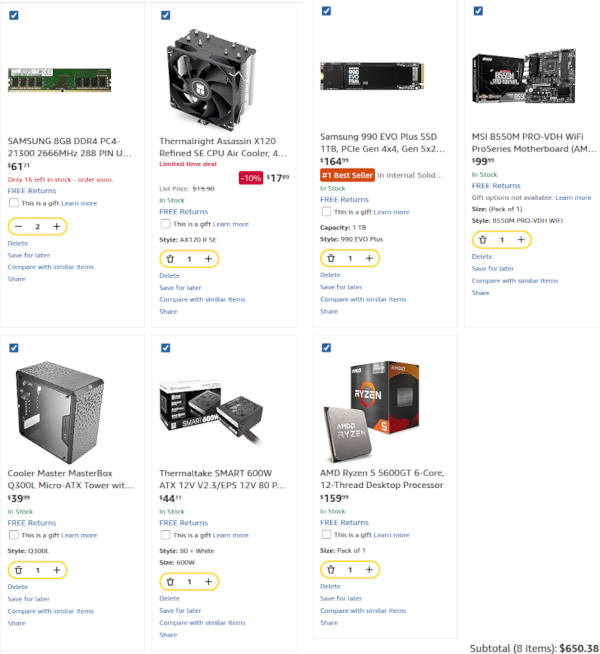
Using the same budget, the custom configuration includes:
- AMD Ryzen 5 5600GT (6 cores / 12 threads)
- 16GB DDR4 (dual-channel)
- 1TB Samsung 990 EVO Plus NVMe SSD
- MSI B550M motherboard (standard micro-ATX)
- Thermalright tower cooler
- Standard ATX 600W power supply
- Cooler Master airflow-focused case
This is not a luxury configuration — it’s a realistic, balanced build using reputable components without stepping into premium pricing.
Side-by-Side Comparison ($650 Budget)
| Category | HP ProDesk 400 G9 SFF (~$650) | Custom Desktop (~$650) |
|---|---|---|
| CPU | Intel Celeron (~2C/4T @ 3.4 GHz) | Ryzen 5 5600GT (6C/12T) |
| Memory | 16GB (configuration not specified) | 16GB dual-channel DDR4 |
| Storage | 1TB PCIe SSD (unknown tier) | 1TB Samsung 990 EVO Plus NVMe |
| Cooling & Airflow | Compact SFF chassis | Standard case with full airflow |
| Power Supply | Proprietary SFF PSU | Standard ATX 600W |
| Upgrade Path | Limited | Fully upgradeable |
| Long-Term Value | Office-focused | Performance + flexibility |
Power Limits in Small Form Factor Systems
Even when small form factor (SFF) systems are configured with more powerful processors than a Celeron — such as Core i5 or i7 models — the compact chassis design often imposes stricter sustained power limits.
OEM firmware in SFF desktops frequently caps long-term processor power (PL1) to control heat within the confined enclosure. While short boost bursts are possible, extended workloads may reduce clock speeds to stay within thermal constraints.
In a standard desktop case with proper airflow and a capable tower cooler, processors are able to maintain higher sustained performance under load. Thermal headroom directly impacts long-duration tasks such as compiling code, rendering, or heavy multitasking.
Storage Quality and Warranty Considerations
Retail Samsung NVMe drives such as the 990 EVO Plus typically include a 5-year manufacturer warranty. That reflects both endurance ratings and long-term support.
In contrast, OEM drives supplied inside prebuilt systems often fall under a 1-year system-level warranty. Even when the underlying hardware is similar, warranty terms and validation tiers can differ between retail and OEM channels.
When a product listing simply states “1TB PCIe SSD” without model information, buyers cannot verify endurance ratings, controller type, or NAND class (TLC vs QLC). That doesn’t automatically mean the drive is low quality — but it does mean performance tier and longevity are not transparent.
Performance and Practical Impact
The biggest difference in this $650 comparison is CPU class. A 6-core / 12-thread Ryzen processor provides substantially more headroom for multitasking, sustained workloads, and future software demands compared to an entry-level dual-core Celeron.
Combined with proper airflow and standard components, the custom system operates under lower thermal stress — an important factor in Florida’s heat and humidity.
Both systems will turn on. Both will run office applications. But one is built around minimum viable performance, and the other is built around balance and scalability.
At the same budget, the difference is not about branding — it’s about design philosophy and long-term capability.
And just as importantly, it’s about serviceability. The ability to upgrade or quickly replace standard components is what makes a system sustainable over time — which is exactly where this discussion originally started.
If you missed the earlier breakdown on compact retail systems and long-term reliability, you can read it here: Mini PC Reliability in Florida.
Still comparing options? Tell us your budget and workflow, and we’ll help you choose a system that makes sense for your performance needs and long-term reliability.