Building a Custom Booking Website for a Private Transportation Company
Many local service businesses eventually outgrow a simple contact form. A private transportation company needs more than a polished homepage: it needs a structured way to collect trip details, calculate or review pricing, handle payments, and notify the operator immediately when a new request arrives.
Recently, Sfixy developed a custom booking website for a private transportation company in South Florida. The project was built as a complete operational workflow: public service pages, destination pages, a dynamic booking form, database-backed pricing, Google Places address autocomplete, Stripe Checkout, webhook payment processing, and admin notifications.
The goal was not to assemble another template-based brochure site. The goal was to build a lightweight custom system that could guide customers through the correct booking path and give the business owner clean, structured requests instead of scattered calls, texts, and incomplete messages.
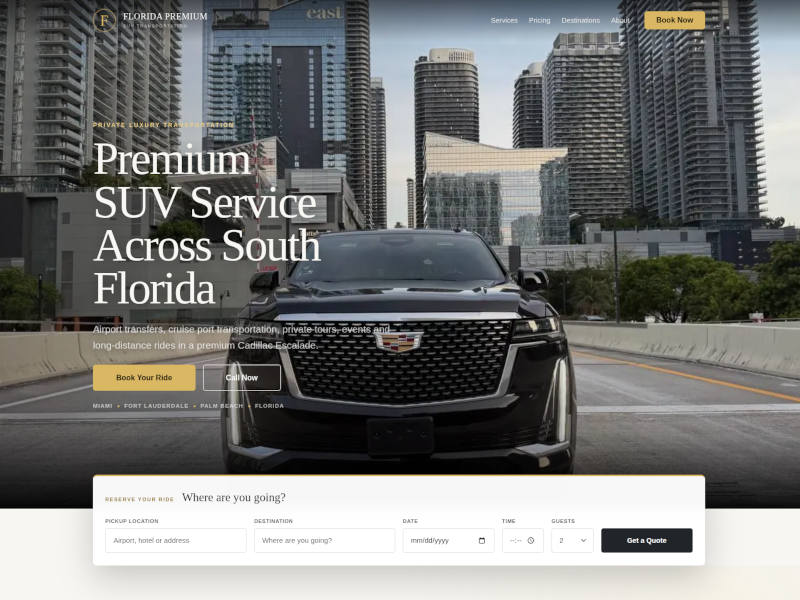 Custom website designed for private transportation company in South Florida.
1. The Problem: A Booking Website Has to Do Real Operational Work
A private driver or chauffeur business cannot rely on a generic contact form. A real booking request depends on structured details:
- pickup location,
- destination,
- date and time,
- airport or cruise-port direction,
- flight or cruise information,
- passenger count,
- luggage estimate,
- and special notes such as stops, child seats or waiting time.
When this information arrives through random phone calls, SMS messages, emails or social media chats, the operator has to reconstruct every request manually. That leads to delays, missing details, pricing mistakes and lost customers.
The booking system was designed to collect the right information from the beginning, while still keeping final confirmation under manual business control.
2. Public Website Structure: Services, Destinations and Pricing
The public website was organized around how customers actually search and make decisions. Instead of hiding everything behind one generic “Book Now” button, the site presents separate service, destination and pricing sections.
Service Pages
The service structure covers the main booking categories:
- Airport Transfers
- Cruise Port Transfers
- Hourly Chauffeur Service
- Private Miami Tours
- Weddings & Events
- Florida Transfers
Each service page explains the use case in plain language and leads users toward the booking flow without overwhelming them with unnecessary technical details.
Destination Pages
Destination pages were created for key South Florida and Florida-wide locations, including Miami, Fort Lauderdale, Boca Raton, Palm Beach, Florida Keys, Naples and Orlando.
This makes the website more useful for real customers and also creates a stronger location-based structure. A visitor can understand not only what the company offers, but also which routes and areas are relevant to their request.
Pricing Page
Instead of hardcoding prices inside static HTML, the project uses a database-backed pricing table. This allows public prices and bookable options to be managed consistently across the website and the booking form.
The pricing structure supports different types of services:
- fixed-price rides,
- hourly rates with minimum hours,
- starting-at pricing for manual review,
- long-distance transfers,
- airport and cruise-port routes,
- and add-on style services.
This is one of the most important differences between a static website and a real business system. Pricing is no longer scattered across multiple pages. It becomes structured data that can be reused by the frontend, the booking form, and the payment logic.
3. Dynamic Booking Form: One Form, Multiple Request Types
The most important part of the project was the booking form. Many service forms fail because they treat every request the same way. An airport pickup, a ride to a cruise port, a local transfer, a wedding package and an hourly booking all need different fields.
Instead of building several separate forms, we created one dynamic booking form that changes its behavior based on the selected Reservation Option.
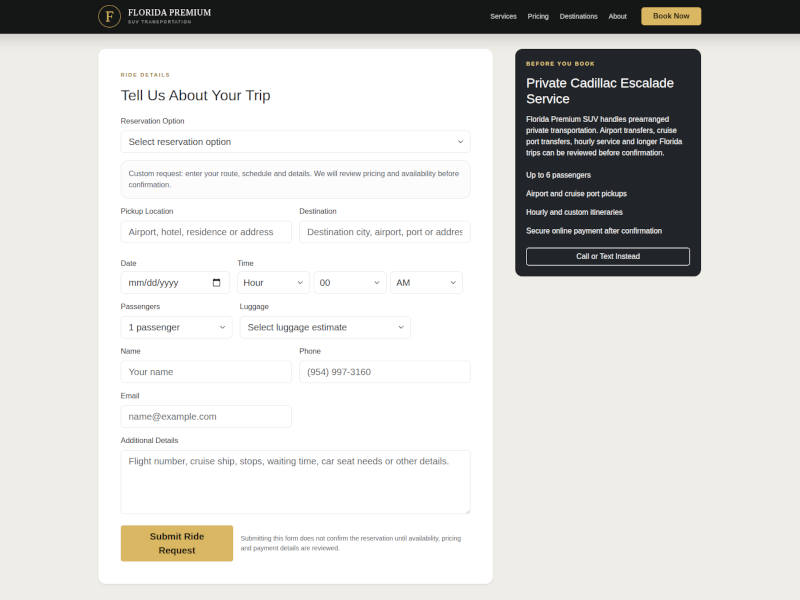 Dynamic booking form with route-specific fields, address autocomplete, passenger details and payment-ready pricing logic.
Airport Transfer Logic
For airport transfers, the form can automatically understand whether the selected route involves MIA, FLL or PBI. The customer then chooses the direction of travel:
- From airport
- To airport
Based on that choice, the form automatically places the airport on the correct side of the trip. For example, if the ride is from MIA, the pickup field is filled with Miami International Airport and the destination remains editable. If the ride is to MIA, the destination becomes the airport and the pickup field remains editable.
This reduces user confusion and prevents common mistakes where customers accidentally reverse pickup and drop-off locations.
Cruise Port Logic
Cruise port transfers use similar logic. The form can detect PortMiami or Port Everglades from the selected option and show cruise-specific fields, such as Ship / Cruise Line.
When the user switches from a cruise transfer to an airport transfer or a local ride, the form resets irrelevant fields so old cruise information does not pollute the new request.
Hourly Booking Logic
Hourly service requires a different workflow. Instead of forcing a strict destination field, the form allows the customer to enter a first pickup location and provide itinerary details. It also exposes a Number of Hours field with a minimum-hour rule.
This makes the same booking form usable for simple point-to-point rides, airport transfers, cruise transfers, private events and hourly reservations.
4. Google Places API: Better Addresses Without Locking Out Manual Input
Address quality is critical for any booking system that depends on real-world pickup and destination locations. A misspelled hotel, incomplete airport name or vague pickup address can create confusion before the service even starts.
To improve address entry, the booking form was integrated with Google Places autocomplete. Customers can start typing a hotel, airport, residence, venue or city name and select a suggested address.
At the same time, the system does not force the user to pick only from Google suggestions. Manual input remains possible because some real-world pickup instructions do not fit perfectly into an autocomplete result.
This balance is important: autocomplete improves data quality, while manual entry keeps the form flexible enough for real customer scenarios.
5. Stripe Checkout and Payment Confirmation
Payment collection was implemented through Stripe Checkout. Instead of collecting card details directly on the website, the system creates a secure Stripe Checkout Session and redirects the customer to Stripe’s hosted payment page.
This keeps sensitive card data away from the website server and gives the business a safer payment flow than a custom card form.
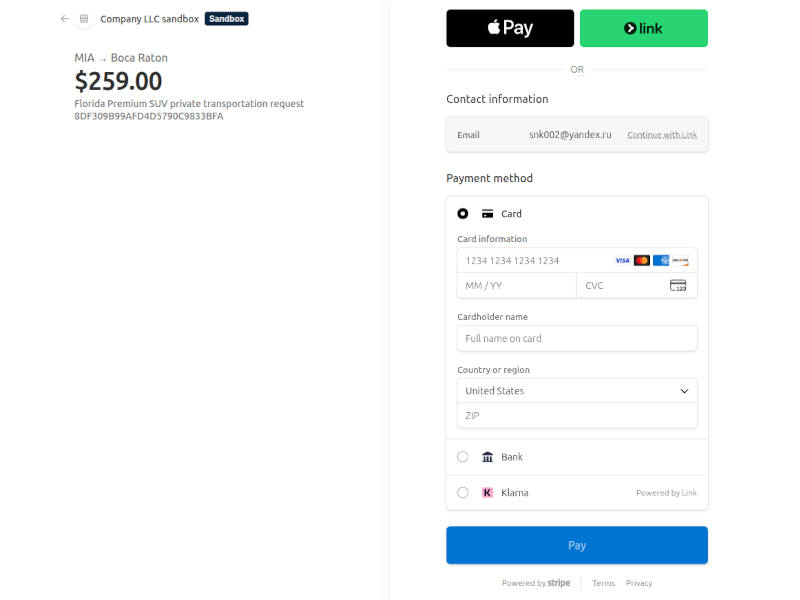 Stripe Checkout integration for secure online payment processing.
Fixed-Price and Hourly Payments
The system supports automatic checkout for eligible fixed-price bookings. For hourly reservations, the checkout amount can be calculated from the hourly rate and selected number of hours, while still respecting the minimum-hour rule.
For requests that require manual review — such as custom long-distance work, events, tours or starting-at pricing — the system can skip immediate payment and send the request into review instead.
Stripe Webhooks
Stripe Checkout is only the first part of the payment flow. The website also needs to know when payment actually succeeds.
For that reason, the project includes a Stripe webhook endpoint. When Stripe sends a completed checkout event, the backend verifies the webhook signature, updates the payment session, marks the booking as paid pending final confirmation, and notifies the operator that payment was received.
This avoids the common mistake of trusting only the customer redirect after checkout. The real payment status comes from Stripe’s server-to-server webhook event.
6. Database-Backed Booking System
Under the interface, the website uses a structured MySQL database rather than email-only form submissions.
Each request receives a unique public reference. The system stores the selected pricing item, route details, pickup and destination, date and time, passenger count, luggage estimate, customer contact details, notes, source, status and payment relationship.
This makes every request traceable and allows the business to connect form submissions, Stripe sessions, webhook events and admin notifications under one consistent reference number.
Why This Matters
Without a database, every request becomes just another email. With a database, the business has a structured operational record.
Even if the first version does not include a full admin dashboard, the foundation is already prepared for future expansion: dispatch notes, driver assignment, quote editing, manual confirmation, payment history, customer history and reporting.
7. Admin Notifications: No More Missed Requests
A booking system is useless if the operator does not know that a request arrived.
The project includes owner notifications for new booking requests and a separate notification after Stripe confirms payment. These messages include critical metadata such as request reference, selected option, route, date and time, passenger count, customer name, phone, email and payment status.
This allows the business owner to react quickly without constantly checking the website database manually.
8. Integration Testing Before Going Live
Before any real payment system goes live, it has to be tested under realistic conditions. For this project, Stripe was first configured in test mode so the complete booking and payment workflow could be verified without charging real cards.
This testing stage covered the full chain:
- booking form validation,
- dynamic route logic,
- Google Places autocomplete,
- Stripe Checkout session creation,
- successful and declined test payments,
- cancelled checkout sessions,
- Stripe webhook handling,
- database status updates,
- and admin notifications.
This is an important part of building reliable business software. A booking system should not be considered ready just because the form submits once. Every major path — successful payment, failed payment, cancelled checkout, manual review and incomplete form submission — must behave predictably before the system is used with real customers.
9. Engineering Stack
The project was built as a lightweight custom PHP application instead of a bloated CMS or plugin stack.
The core stack includes:
- PHP backend with custom GPCL-based page classes,
- MySQL database for pages, pricing, bookings and payment sessions,
- Bootstrap-based responsive frontend,
- Vanilla JavaScript for dynamic booking behavior,
- Google Places API for address autocomplete,
- Stripe Checkout for secure payment flow,
- Stripe webhooks for payment confirmation,
- and Telegram/email notifications for the operator.
This architecture keeps the website fast, portable and easier to control than a heavy no-code or CMS-based solution. The business owns the workflow logic, the database structure and the codebase instead of depending on a fragile stack of plugins or closed SaaS tools.
10. Main Takeaway
A custom booking website should not be treated as a decorative online brochure. For a service business, the website often becomes the first operational layer of the company.
It must explain services clearly, guide customers through the correct request path, collect structured details, support different service types, handle payments securely and notify the operator instantly.
This project demonstrates how a focused custom build can turn a standard business website into a complete booking workflow — without relying on heavy frameworks, generic templates or fragile plugin combinations.
Need a Custom Booking Website or Business Automation System?
Sfixy develops custom websites, booking systems, payment integrations, workflow automation tools and backend infrastructure for service businesses across South Florida.
Whether you need Stripe Checkout integration, Google Places API, admin notifications, a client portal, an internal workflow system or a full custom booking process, we can build a lightweight solution around your real business operations.