Small Business IT Support After an ISP Change: A Real Boca Raton Case
Changing an internet provider at a business may sound like a simple router replacement. In practice, many small offices depend on the network for much more than Wi-Fi.
In this Boca Raton case, a business internet migration affected multiple connected systems, including the point-of-sale environment, security cameras, remote camera access, guest Wi-Fi, and network-connected audio equipment.
The goal was not simply to restore internet access. The entire business network had to be reviewed and reconfigured so that the systems depending on it could continue operating normally.
Why an ISP Change Can Affect the Entire Business
Modern small businesses often have many independent devices connected to the same network. Some require only internet access, while others depend on local IP addresses, router settings, port configuration, remote-access services, or communication with other devices on the LAN.
Replacing the internet provider can change the router, local subnet, gateway addresses, DHCP assignments, firewall behavior, and public IP address. Equipment that worked normally on the previous network may therefore stop communicating even though the new internet connection itself is working.
That was the situation here. The new connection was active, but several business systems needed additional work before the office could operate normally again.
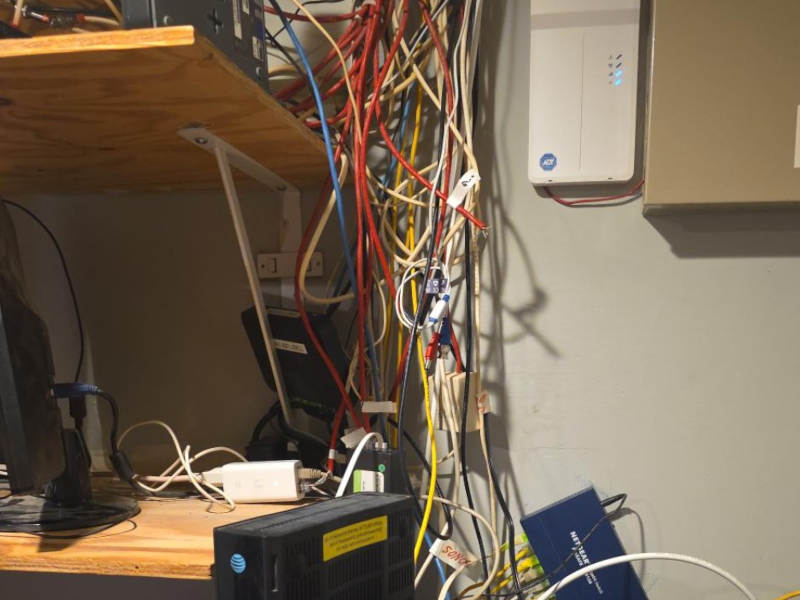 Business network equipment during the internet provider migration
Reviewing the Existing Network
The first step was to determine which devices depended on the previous network configuration and which settings had changed during the migration.
Rather than troubleshooting each device as an unrelated problem, the network was treated as one connected environment. This made it possible to identify which failures were caused by addressing, routing, or configuration changes introduced by the new internet service.
This type of approach is particularly important in small-business environments because systems such as cameras, POS terminals, printers, media devices, and employee Wi-Fi may all appear to have separate problems when the actual cause is a change at the network level.
Restoring the Security Camera System
The business security system included an Amcrest NVR used for local recording and remote camera access.
After the ISP and network changes, the NVR needed to be brought onto the new network correctly and its remote-access configuration reviewed.
Network settings were corrected and DDNS access was restored so that the camera system could again be reached remotely without depending on the previous provider configuration.
Keeping the POS and Other Business Devices Online
The location also relied on a Toast point-of-sale system and other network-connected equipment. These devices had to remain functional while the surrounding network infrastructure changed.
POS systems are a good example of why business network work needs to be handled differently from a typical home Wi-Fi installation. Losing connectivity may immediately affect transactions, staff workflow, and normal business operations.
Each affected device was checked after the network changes to confirm that it could obtain the correct network configuration and communicate normally through the new connection.
Rebuilding Guest Wi-Fi
Guest wireless access was also part of the network and needed to be restored without interfering with the systems used for normal business operations.
The guest network configuration was reviewed and brought back online so visitors could access Wi-Fi while the business equipment continued operating on the appropriate network.
Separating the requirements of guest devices from business equipment is especially useful in locations where many customers may connect throughout the day.
Network-Connected Audio and Other Devices
The network was also used by Sonos audio equipment. Systems like this are easy to overlook during an ISP migration because they are not traditional computers, but they still rely on the local network for discovery and communication.
After the primary network configuration was corrected, connected devices were checked to make sure they had successfully transitioned to the new environment.
This is one of the main reasons an apparently simple internet-provider change can become a broader small business IT support project. The internet connection is only one part of the system.
One Network Change, Multiple Systems
By the end of the service, the new internet connection was integrated with the existing business environment rather than treated as a standalone installation.
The work included restoring connectivity and configuration for multiple systems that depended on the network:
- Business internet and routing
- Toast point-of-sale equipment
- Amcrest NVR and security cameras
- Remote camera access and DDNS
- Guest Wi-Fi
- Sonos and other network-connected devices
Each individual component was different, but the underlying problem was shared: all of them depended on the network that had just changed.
Result
The business completed its transition to the new internet provider while retaining the systems it already relied on.
Internet access, guest Wi-Fi, the POS environment, security cameras, remote NVR access, and other connected devices were restored and verified on the new network.
 Business systems restored after the ISP and network migration
Key Takeaway
For a small business, changing an internet provider is often not just an internet installation. The router and network may be supporting payment systems, cameras, printers, audio equipment, employee devices, guest Wi-Fi, and remote-access services at the same time.
When the network changes, troubleshooting the environment as a complete system is usually faster and more reliable than treating every affected device as a separate failure.
This is also why having one IT contact who understands the computers, network, printers, and connected business systems can be valuable for a small office.
Need Small Business IT Support?
Sfixy IT Services provides on-site small business IT support in Boca Raton and nearby South Florida areas, including computers, office networks, Wi-Fi, printers, business devices, ISP migrations, and troubleshooting across multiple connected systems.
For dedicated network services, see our Network Setup & Wi-Fi Services.