Recovering a Windows PC After an AMD RAID 0 Failure: A Real Repair Case from Pompano Beach
When a Windows Error Is Only the Symptom
Random Windows boot failures can be difficult to diagnose because software corruption and failing hardware often produce similar symptoms. This recent repair for a client in Pompano Beach was a good example. Although Sfixy is based in Boca Raton, we regularly provide on-site computer diagnostics and repair throughout Pompano Beach, Deerfield Beach, Delray Beach, and surrounding South Florida areas.
The computer could no longer start Windows and repeatedly displayed a REGISTRY_ERROR during boot. Automatic recovery did not work, and even Safe Mode failed to load. At first glance, the problem looked like a damaged Windows installation. Further diagnostics showed that the operating system was only one part of a much larger storage problem.
The computer contained two 1 TB Samsung NVMe SSDs: an older Samsung 970 EVO Plus and a newer Samsung 990 EVO. They had been configured through the motherboard's AMD RAID system. A separate 2 TB SATA hard drive was also installed for additional storage.
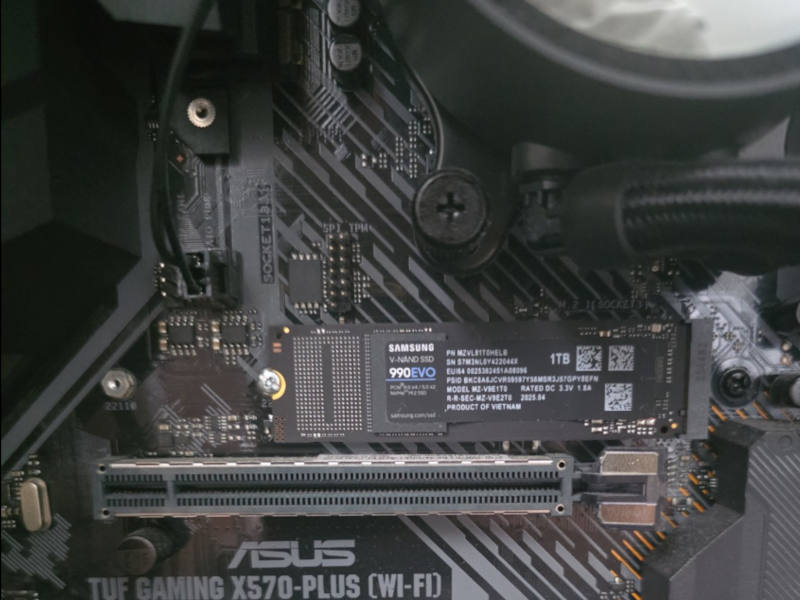 The system used two different generations of Samsung NVMe storage on an ASUS TUF Gaming X570 motherboard.
Why I Did Not Reinstall Windows Immediately
A common response to a serious Windows boot failure is to erase the system drive and reinstall the operating system. That would have been premature in this case.
Before changing the RAID configuration or writing anything to the SSDs, I first needed to determine whether the client's files were still accessible. Even when a client says there is nothing especially valuable on a computer, it is safer to verify that assumption before deleting partitions or rebuilding storage.
Windows Recovery could not properly access the drives, so I booted the computer from an Ubuntu Live USB. Linux provided a separate environment that did not depend on the damaged Windows installation or its recovery tools.
From Ubuntu, both Samsung NVMe drives and the additional SATA disk were visible. I inspected the storage layout, mounted the Windows partition in read-only mode, and confirmed that the remaining files could still be accessed.
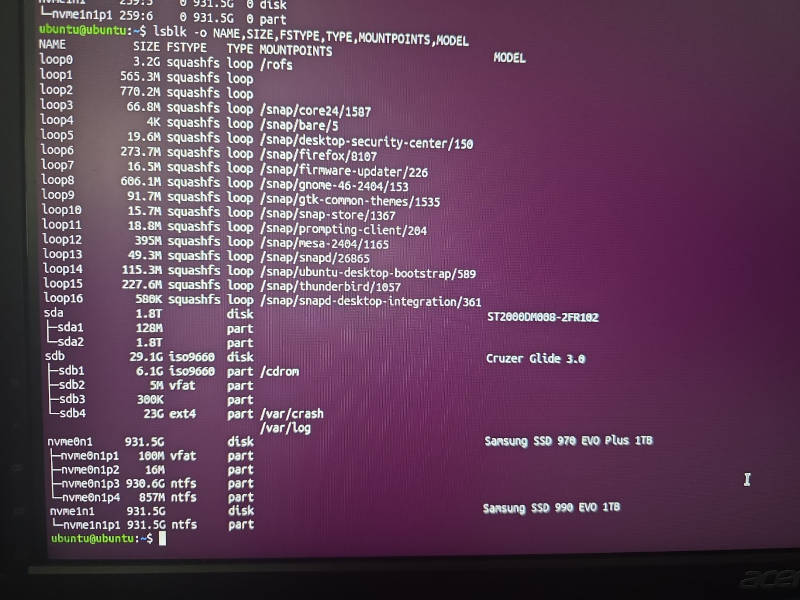 Ubuntu Live was used to inspect the NVMe drives, mount the Windows partition safely, and copy the remaining important files before modifying the RAID configuration.
A small number of documents were copied from the Windows volume to the separate SATA drive. Only after the available data was protected did the repair move on to changing the storage configuration.
The Risks of RAID 0 on a Personal Computer
RAID 0 combines multiple drives into a striped volume. Part of each file is written to one drive and part to the other. This can improve sequential performance in certain workloads, but it provides no redundancy.
If either drive or its connection becomes unreliable, the entire RAID 0 volume can become unusable. Combining two SSDs also means that the stability of the array depends on both drives, the motherboard RAID implementation, its drivers, and the firmware configuration.
That tradeoff is rarely worthwhile for a normal home or professional desktop using modern NVMe SSDs. A single healthy NVMe drive is already fast enough for most workloads, while RAID 0 adds complexity and increases the risk of losing the complete volume after a single component failure.
The AMD RAID configuration was removed so that both SSDs could be evaluated and used independently.
Windows Still Would Not Install
After dismantling the RAID array, I initially attempted to reuse the older Samsung 970 EVO Plus as the system drive. The plan was to install Windows on the 970 and leave the newer 990 EVO available as additional storage.
That attempt failed. Windows Setup could see the storage layout, but it could not successfully continue creating and configuring the required system partitions. Attempts to rebuild the boot files also failed.
The computer eventually displayed a Windows Boot Manager error indicating that the Boot Configuration Data was missing or contained errors. That message described the immediate boot problem, but it did not explain why the storage configuration could not be repaired reliably.
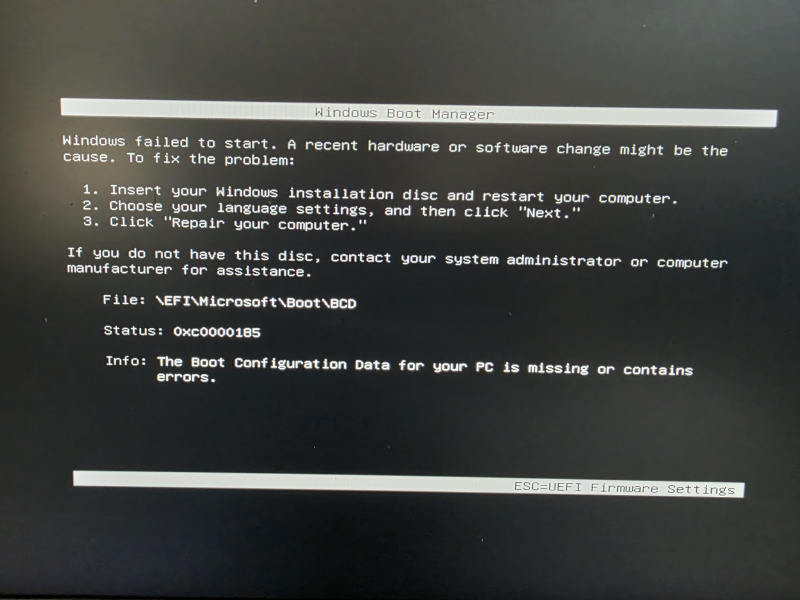 Windows reported missing or damaged Boot Configuration Data, but repeated repair failures suggested a deeper storage problem.
The Older NVMe Drive Became the Main Suspect
During the installation attempts, the Samsung 970 EVO Plus became abnormally hot despite being installed under the motherboard's M.2 heatsink. The excessive heat, combined with the failed Windows installation and the earlier RAID instability, made the older SSD the primary suspect.
SMART information does not always expose every developing NVMe problem. A drive may still report acceptable health while its controller behaves unpredictably during sustained access, partition changes, or operating system installation.
The 970 EVO Plus was also approximately six years old, while the Samsung 990 EVO had been used for only about a year. The 990 EVO is not an enterprise or Samsung PRO-series SSD, but in this situation it was the newer, healthier, and lower-risk option.
Continuing to spend time repairing Windows on an SSD that was overheating and failing installation operations no longer made practical sense. The 970 EVO Plus was removed, and the operating system was installed on the Samsung 990 EVO instead.
A Clean Installation on a Single Healthy SSD
Windows installed normally on the 990 EVO once the older drive and RAID configuration were removed from the equation. The required EFI, system, and recovery partitions were created successfully, and the computer returned to normal operation.
The final configuration was also simpler. Instead of depending on two different NVMe drives in RAID 0, Windows now runs from one independent SSD. This makes future diagnostics, backups, recovery, and drive replacement considerably easier.
The separate SATA drive remained available for additional storage, including the documents recovered before the RAID array was dismantled.
What This Repair Demonstrates
The original REGISTRY_ERROR made the incident look like a Windows problem. In reality, the damaged registry and boot configuration were symptoms of instability within the storage subsystem.
This case also demonstrates why a Windows reinstall should not always be the first step. Reinstalling immediately could have destroyed the only accessible copy of the client's remaining files. Booting Ubuntu first allowed the storage layout to be inspected and the documents to be copied before any destructive changes were made.
It is equally important not to rely on one diagnostic indicator. SMART data can be useful, but a drive that reports acceptable health may still behave abnormally during real operations. Installation failures, excessive controller heat, disappearing devices, and unstable RAID behavior can provide evidence that a basic health percentage does not show.
Most importantly, RAID 0 should not be treated as a substitute for a properly selected system SSD. For most personal and professional computers, the small theoretical performance benefit is not worth doubling the number of drives that can destroy the complete volume.
Need Help with a Windows Boot or SSD Problem?
If your computer displays REGISTRY_ERROR, repeatedly enters Automatic Repair, cannot start Safe Mode, loses access to an NVMe drive, or refuses to install Windows, the operating system may not be the real cause.
Sfixy provides Windows boot diagnostics, SSD troubleshooting, data transfer, RAID evaluation, clean Windows installation, and computer repair in Pompano Beach, Boca Raton, Deerfield Beach, Delray Beach, and surrounding South Florida areas.